



Table of Contents
-
IT Procurement Best Practices For Reducing Everyday Operational Friction
-
Where An IT Procurement Best Practice Protects Budget And Continuity
-
Best Practices In IT Procurement For Cloud, Security, And Support Alignment
-
IT Procurement Process Best Practices That Make Approvals Easier To Manage
-
Procurement Practices For IT That Support Long-Term Vendor Stability
A new hire waiting on a laptop loses a first morning to avoidable delay. A license renewal slips, and customer service can’t access the phone queue before a busy week. Backup storage gets purchased, but no one confirms recovery timing.
Strong IT procurement turns those moments into planned work by tying purchases to uptime, security, supportability, and budget. These IT procurement best practices start before the order, with cloud, VoIP, data protection, and long-term management already considered.
Matt Lieneck, Service Desk Manager at Auxzillium, notes: “Procurement works best when every purchase has an owner, a support path, a security check, and a recovery plan before the invoice is approved.”
IT Procurement Best Practices For Reducing Everyday Operational Friction
Procurement discipline reduces the small disruptions that fill ticket queues: mismatched laptop models, expired licenses, missing permissions, and software the support team can’t manage. At Auxzillium, we favor a standardized solution stack because consistent tools shorten troubleshooting and help support resolve issues cleanly on the first touch.
-
Fewer support variations: Standard hardware, software, and configurations reduce avoidable tickets when a printer driver, VPN client, or endpoint agent behaves differently across users.
-
Cleaner user onboarding: New staff need the right device, email, security tools, file access, and phone setup before their first customer handoff.
-
Better renewal control: Licenses, warranties, VoIP contracts, and cloud subscriptions need ownership and calendar visibility before the invoice arrives.
-
Security from purchase: Endpoint protection, identity controls, and backup requirements belong in the buying decision, not after deployment.
Where An IT Procurement Best Practice Protects Budget And Continuity
Purchasing choices show up later in invoices, downtime windows, audit requests, and expansion plans. The goal is to keep spending visible while making sure systems remain recoverable, supportable, and owned by you, even when we design, configure, and manage the environment.
-
Unplanned spending gets contained: Surprise renewals, emergency hardware replacement, and duplicate subscriptions become easier to spot.
-
Access delays are reduced: Identity setup, role-based access, device readiness, and manager approvals move together.
-
Backup choices match recovery needs: Storage purchases must align with recovery timing, retention, and the cost of interruption.
-
Cloud costs stay accountable: Microsoft Azure, licensing, virtual desktops, and cloud hosting fit better when monthly operating expense planning replaces one-off infrastructure buys where appropriate.
-
Compliance evidence becomes easier: HIPAA, CMMC, NIST, GDPR, PCI, and SEC requirements depend on documentation, controls, and ownership, not just the tool itself.
|
Procurement Control Point |
Operational Trigger |
Primary Owner |
System of Record |
Evidence or Metric to Track |
|---|---|---|---|---|
|
Renewal review checkpoint |
90 days before Microsoft 365, Azure Reserved Instance, endpoint security, or backup platform renewal |
IT manager with finance controller approval |
Procurement calendar, contract repository, Microsoft Admin Center |
Unused licenses removed, duplicate tools retired, renewal decision logged before invoice date |
|
New-hire technology workflow |
HR submits signed offer for employee starting within 10 business days |
HR coordinator, help desk lead, department manager |
HRIS, ticketing platform, Entra ID, device management console |
Laptop shipped, MFA enabled, group memberships approved, first-day login confirmed |
|
Recovery-tier purchasing review |
Business unit requests new file share, database, SaaS backup, or hosted workload |
Operations leader and backup administrator |
Backup console, asset inventory, business impact analysis |
RTO, RPO, retention period, encryption status, and restore test date recorded |
|
Cloud spend governance cadence |
Monthly Azure invoice exceeds forecast by 15% or new virtual desktop pool is requested |
Cloud architect and accounting manager |
Azure Cost Management, licensing portal, budget dashboard |
Tagged resources, budget alerts, right-sizing actions, chargeback or showback report completed |
|
Compliance-ready deployment gate |
New system will store patient records, payment data, controlled information, or regulated client files |
Security officer and project sponsor |
GRC platform, configuration baseline, change approval board notes |
Access review, logging settings, encryption proof, vendor risk record, control mapping attached |
Best Practices In IT Procurement For Cloud, Security, And Support Alignment
A Boston-area company adding a second office may order laptops, expand Microsoft 365, move workloads into Azure, and replace desk phones with VoIP in the same quarter. If those purchases happen separately, support coverage, identity controls, backup capacity, and phone routing fall out of sync just when staff need a smooth opening week.
Picture a multi-location office coordinating approvals for laptops, Azure resources, VoIP handsets, endpoint protection, and backup capacity. HR needs accounts ready, finance needs clean invoices, and support needs agents installed before users start opening tickets. These are the moments where best practices in IT procurement become operational planning, not paperwork.
We build security into procurement and deployment from the start, using multiple layers of protection and a documented NIST-based approach. Our team reviews each tool’s capabilities and limits before deployment, and staff complete vendor-led training so a good purchase doesn’t become a misconfigured system.
Related IT Planning Guides
IT Procurement Process Best Practices That Make Approvals Easier To Manage
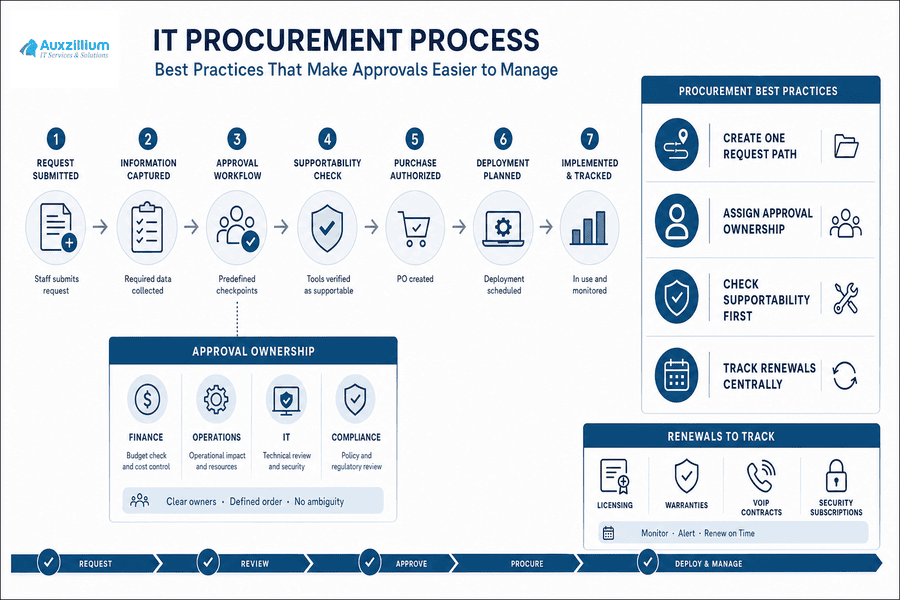
Changing purchasing habits is hard because requests often move through finance, operations, department managers, IT, and outside vendors before anyone sees the full picture. IT procurement process best practices give that workflow a single path, so approvals don’t stall between a software request, budget check, security review, and deployment ticket.
-
Create one request path: Define how staff request devices, software, cloud resources, phone changes, and access.
-
Assign approval ownership: Name finance, operations, IT, and compliance checkpoints before purchase orders are issued.
-
Check supportability first: Confirm tools can be monitored, patched, backed up, secured, and supported before buying.
-
Track renewals centrally: Keep licensing, warranties, VoIP contracts, and security subscriptions visible before they expire.
When we onboard a managed environment, that discipline continues through staff introductions, access setup, agent installation, antivirus deployment, and a practical review of systems, cloud resources, identity, networks, and cybersecurity posture before work begins.
Simplify Your IT Purchasing
Avoid procurement delays, tool sprawl, and surprise costs. Let Auxzillium help align every IT purchase with support, security, and continuity.
Procurement Practices For IT That Support Long-Term Vendor Stability
Vendor stability matters when a circuit drops, a warranty question blocks replacement, or a cloud admin account is needed during an outage. At Auxzillium, we’ve worked in IT for 25 years, with over 150 years of combined staff technical experience, so we’ve seen how a low purchase price becomes expensive when vendors are fragmented and documentation is thin.
-
Reduce vendor sprawl: Fewer unmanaged relationships mean clearer accountability during outages, renewals, invoice disputes, and support escalations.
-
Keep ownership clear: Clients should retain ownership of cloud environments, licenses, tools, and documentation while we design, configure, and manage the environment.
-
Match vendors to operations: Choose providers based on response expectations, onsite needs, security requirements, and multi-location support.
Making Better IT Purchasing Decisions With Auxzillium
Disciplined IT purchasing reduces support tickets, access delays, renewal surprises, downtime exposure, and security gaps because every purchase is tied to how people actually work.
At Auxzillium, we support SMBs with managed IT services, cloud, security, backup and recovery, VoIP, virtualization, and support planning. We use a standardized solution stack to simplify support while clients retain ownership of implemented tools.
Contact us for a no-cost review of your systems, networks, cloud environment, cybersecurity posture, and procurement workflow, so the next laptop, license renewal, or backup purchase is planned before it interrupts the workday.
